How to create a store page to sell music and merch on your website

Updated by Julia Kater on Apr 22, 2025 in: Website Tips, Selling Music Online
Posted on Aug 18, 2016

As an artist, you’re driven to create—and setting up an online store for your music and merch, right on your own website, is a powerful way to connect with fans and earn income.
Selling music and merch online might not be something you’ve attempted before, but it's an exciting opportunity to grow beyond creating exclusively music—it's your chance to step into the role of music entrepreneur. With this small shift in mindset, you can start turning your passion into a thriving music business.
Setting up a music store on your website is a smart, worthwhile step toward diversifying your streams of income and making money from your music. So let’s dive into how you can get started— from choosing the right merch to building a store page that works. Here are five key steps to help you launch your successful online store:
1. Set up your merch store page
2. Decide what band merch you’ll sell
3. Consider print-on-demand merch
4. Band merch store page layout
5. Create your store page design
1. Set up your merch store page
If you’re ready to start selling your music and merch online, chances are you’ve already built a website for your music. Now it's time to create a dedicated store page—a space where you can focus your efforts on selling your merch and music directly to fans.
Start simple with a store page that offers physical products like CDs, vinyl, and band merch. You can include digital downloads here as well, but it's often more effective to create a separate music page for that content, giving fans a more streamlined experience when they purchase downloads of your music.
PRO TIP: Don't have CDs or vinyl pressed yet but want to offer those options? Check out our good friends at Disc Makers—they offer a full range of high-quality vinyl and CD products to help bring your music to life.
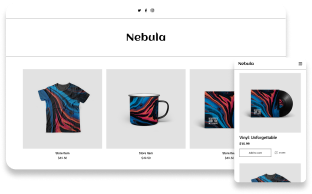
Once your store page is live, take some time to think about the layout and design. If your items feature bold, colorful artwork, a clean background with a grid layout will help them stand out. Planning to sell a variety of merch items tied to different releases? Set up your page with clear sections so fans can easily browse what you have on offer.
2. Decide what band merch you’ll sell
Choosing what band merch to sell online in your store page takes some thought. Merch has been the top source of revenue for many Bandzoogle members over the past few years, so starting with essentials like t-shirts, bags, hats, stickers, and other fan favourites is a great first step.
You can also ask your fans directly what they’d be excited to buy, and create a few products based on their feedback. It's also smart to align your merch with your current promotions. For example, are you releasing a new single or album? If so, design a few merch items tied to that launch. This gives fans something tangible to connect with your music—and helps you promote the release in a memorable way.
BONUS: With Bandzoogle's commission-free Store feature, what you make from every sale is yours to keep. You can sell more than just physical merch, too—think virtual music lessons, exclusive concerts, handwritten lyrics, custom song transcriptions, and more.

Artist store page example: Ships Have Sailed
3. Consider print-on-demand merch
Print-on-demand merch is a great option, whether you're just starting out as a musician or already have a loyal fan base.
The beauty of print-on-demand is that you can offer merch without upfront investment or inventory.
You can easily create products like t-shirts, hoodies, or leggings, and test out what resonates best with your fans—all with the most minimal risk.
If you're preparing for a new album release, print-on-demand is a great way to offer a wide variety of new merch to support it.
To get started, set up a dedicated merch section on your store page, create your products in your Printful account, and then sync the two. Any items you create using Printful’s print-on-demand service will integrate seamlessly with your existing store. For example, you can complement your new vinyl release with custom stickers or mugs, and sell everything in one convenient place.

Artist store page example: Aayden
4. Band merch store page layout
With the variety of items and color options that print-on-demand services offer, your store page can fill up fast. To keep it tidy and fan-friendly, aim for a clean, organized layout that is easy to navigate and makes it quick for visitors to find what they're looking for.
Start by deciding what products you'll offer, and then think about how to organize them on your store page. This could be by grouping, for example:
- By type: Keep all digital music together, physical music (CDs, vinyl, etc.) in another section, and merch in its own area.
- By release: Group products by album or era—e.g., CD, signed CD, digital download, and bundle for a single release.
- By theme: Bundle related items like a T-shirt with the album cover or a hoodie and poster from the same tour.
If your store page isn’t structured album-by-album, you could organize it in a way that suits your catalog. For example:
- Selling digital files? Group these by type (like sheet music, sample packs, stems, etc.) or release date.
- Running a label? Create separate sections for each artist on your roster.
Once you've mapped out your product categories, choose a layout that supports them visually. A grid-style layout works great for a broad range of items. If you’re offering multiple variations of each product, a layout that showcases multiple images per item can be more engaging, and helps fans to feel confident in what they're buying.
If you include many groups of items, you can add multiple Store features on the page, each with their own name. Then put these Store features into different sections. Each section can be styled to differentiate their place on the page.
You could also add sub-pages to your main store menu, and set those to jump down the page to a specific merch section when clicked.

Artist store page example: Chase Summers
5. Create your store page design
Once you’ve decided on your products and how you'll lay them out, creating your store page should come together quickly.
If you have a larger musician website, carry over the branding and aesthetics that you’ve used in promoting your music to date. This helps create a cohesive, professional look across your website.
If you are starting from scratch with a design, keep it simple:
- Choose a minimal website template to let your products shine.
- If you’re adding any colorful album art, a plain page background will help everything stand out.
- Focusing on just one release? Tie everything together visually by using a background color or image that echoes your artwork.
For a modern, muted vibe, add a background image with reduced opacity—by fading it slightly, your store products sitting overtop will be eye-catching.
If you’ve chosen to include multiple Store features in dedicated sections, use a preset palette of colors to be sure that these sections are styled similarly, so they flow nicely on the page.
Whatever design you choose for your website's Store feature, your store page should not feel cluttered. A clear and well organized layout is key to successfully selling your music online. This might mean swapping out available items regularly, using a simple white background, or re-arranging products to keep your page visually balanced.

Artist store page example: The Afro-Caribbean Jazz Collective
Creating a store page on your website requires some planning and content creation, but it's one of the best ways to make money as a musician. Beyond that, your store page is a powerful tool to promote your music naturally—every new product is a fresh opportunity for you to talk about your music and share what you're working on. If you're serious about monetizing your music career online, your store page is worth putting real effort into. Keep it simple, clear, and aligned with your identity as an artist. Update it regularly, keep your fans in the loop, and over time, your store page will become a key part of your success.
Build a stunning band website and store in minutes
- Promote your music on your own unique website.
- Sell music & merch directly to your fans. Keep 100%.
- Grow your fan base with built-in marketing tools.
Free 14 day trial, no credit card needed.

Comments